AO3 News

Post Header

AO3 Update

We're excited to announce that we're exiting open beta! We've come a long way from when we announced and launched AO3 open beta in 2009.

At launch, there were just 347 AO3 accounts and 6,598 works. While we started growing very quickly, we were originally much more limited in what we could do.

Did you know that AO3 invitations were originally sent out manually by individual AO3 volunteers? During our initial rapid growth, we were still only sending out about 1200 invitations per day, and eventually tapered off to 50 per day. Today, we send around 6,000 invitations every 12 hours. Our old news posts also include fun stats about what AO3's user base and works looked like in 2009, which you can compare to the stats post we recently shared in January to see how far we've come.

What's Changed Since Then

Since 2009, AO3 has grown and changed a lot. We've introduced many features over the years through the efforts of our volunteers and coding contributors, as well as the contractors we've been able to hire thanks to generous donations from our users. While there are a lot of additions we're proud of, some of our favorites include:

Looking at where we are now in 2026, we recently celebrated 10 million registered users and 17 million fanworks! We're grateful for all the fans that have accompanied us all this time—all of our accomplishments are thanks to you!

Some recent improvements we've made include adding new options to bookmark and collections filtering and updating all of the buttons at the bottom of the forms for posting, previewing, or editing a work to make them more user-friendly.

What's Next for AO3 and How You Can Help

As the AO3 software has been stable for a long time, the change is mostly cosmetic and does not indicate that everything is finalized or perfectly working. Exiting beta doesn't mean we'll stop continuing to improve AO3—our volunteer coders and community contributors will still be working to add to and improve AO3 every day. For one, it’s likely you’ll continue to see references to us being in beta for a while as we update our documentation.

If you'd like to see what issues are being worked on, check out our project on Jira. This is a public list of all the bugs and features that are on the to-do list for our coders.

If you're familiar with coding and would like to contribute your time, we welcome contributions from anyone! Take a look at our Contributing Guidelines and other documentation on GitHub. All contributors are credited in our release notes.

If you're interested in helping AO3 but don't have any coding ability, consider volunteering for one of the other teams that work on AO3 or contributing to AO3 in some other way.

If you have a feature request or bug to report, please contact AO3 Support. Support handles communication between users and the various teams involved with AO3. The Support team helps to resolve technical problems experienced by users and passes on users' feedback to the relevant committees.

Circular badge with the words 'I was here for beta' with an AO3 logo

For all the fans who were part of our beta journey from 2009 until today, here's a badge for you, as a small thank you for your support! You're welcome to display this badge on social media, your AO3 profile, or any other website of your choosing. For example, if you want to display the badge in your AO3 profile, add this HTML tag: <img src="https://media.archiveofourown.org/news/ao3-updates/2026-04-leaving-beta/badge-english.png" alt="Circular badge with the words 'I was here for beta' with an AO3 logo"> into the "About Me" section in your profile. If you’d like more information on how to embed images, refer to our Posting and Editing FAQ or our guide on how to format HTML on AO3!

We are deeply appreciative and grateful for all the support we've gotten from fans since we were founded, so let us be the first to say: Welcome to Post-Beta AO3!


The Organization for Transformative Works is the non-profit parent organization of multiple projects including Archive of Our Own, Fanlore, Open Doors, OTW Legal Advocacy, and Transformative Works and Cultures. We are a fan-run, donor-supported organization staffed by volunteers. Find out more about us on our website.


Comment

Post Header

We've just given the code for collection browsing and filtering a much-needed overhaul! In addition to some long overdue performance improvements, this update introduces collection tags — a new way to find collections featuring the fandoms, relationships, tropes, and other topics you enjoy.

How do collection tags work?

Collection owners can now use up to 10 tags of any type (What are the different types of tags?) to describe their collection. The tags are listed on the collection blurb, and the collection filters have a new "Filter by tag" autocomplete field to help users find collections matching their interests.

A collection blurb next to the collection filters. The blurb has tags listed under the collection title and the filters have a 'Filter by tag' field beneath 'Filter by title.'

While it is possible to use brand new tags on collections, we strongly encourage owners to use existing canonical tags or their synonyms. This makes it easier for users to find your collection using the autocomplete options in the collection filters.

We've also added a "Multifandom" option specifically for collections that feature a wide variety of fandoms. Collection owners can select this option to help users find collections where the focus isn't a specific fandom, but rather a theme like fanvids of old films or fic written in first person. We think this will be particularly useful for users whose fandoms don't have their own prompt memes or gift exchanges, but who want to find challenges they might be able to participate in.

Please note that while we encourage collection owners to start using the "Multifandom" option right away, there are a few more changes we need to make before it will be possible to filter collections based on their multifandom status. We'll update this post when multifandom filtering becomes available.

What about existing collections?

Together with the collection tags feature going live, we automatically tagged existing collections with the fandoms from their works and bookmarks, as well as any works or bookmarks in their subcollections.

Additionally, collections with more than one unrelated fandom were automatically marked as multifandom. We used our tag wrangling system to determine whether fandoms are related, just like we do when marking works as crossovers. Collections with more than 10 fandoms (the limit for collection tags) were marked as multifandom but did not have any fandom tags added.

Collection owners are welcome to edit their collection and change any information we automatically added.

Other changes

As part of the browsing and filtering overhaul, there are a few other noticeable changes to collections.

  • Subcollections are now listed on the main Collections page and included in the results when filtering.
  • In order to make room for collection tags, we've combined the list of owners and moderators in blurbs, similar to the way they're combined on the collection profile. Because we know this distinction may be important to some users, we've made it possible to style owners and moderators separately by using the a.owner and a.mod selectors in a site skin. (Your styles will apply in the blurb and on the collection profile.)
  • The Open Challenges page, including the Open Gift Exchanges and Open Prompt Memes pages, now list collections that are closing the soonest at the top of the page.

Update 12:14 UTC 28 September 2025: The multifandom filtering options have now been added to the filters!

Comment

Post Header

Over the past several months, the Archive of Our Own has been experiencing an increase in spam comments left by registered users. To help prevent these comments, which typically ask for contact information and offer art commissions or collaboration, we'll be introducing limits on commenting and other activities for logged-in users. We expect to have these limits in place within the next few days.

As a result of these limits, you may get error messages telling you to "Retry later," especially when leaving or editing multiple comments over a short period of time. Our aim is to slow down the spammers with minimal impact on legitimate commenters, so we'll be monitoring the situation and adjusting the rate limits as needed once the code is in place. (This also means we can't tell you exactly what the limits are. However, we recommend waiting at least 15 minutes before trying again.)

Once these limits are in place, we'll also be looking into other methods that we hope will reduce spam with even less disruption to legitimate users. We apologize for the inconvenience and appreciate your understanding as we work to find a balance that meets everyone's needs.

Update 21:45 UTC 24 March 2025: Rate limiting for logged-in comments is now in place.

Comment

Post Header

Bullhorn and the words 'OTW Announcement'

With approximately 7 million registered users on AO3 and thousands of OTW members, news posts get more engagement than ever. We love when users express their thoughts or concerns regarding the news we publish! However, the comment sections on some of our previous news posts have not been a welcoming or safe space for engagement.

In recent months, we have developed a News Post Moderation policy and recruited a team of volunteers who you may see commenting on posts in the future. We would like to announce the key points of the policies our News Post Moderators will be following when monitoring the comment sections of our News Posts.

Comments on news posts may be frozen or hidden by a News Post Moderator if they contain:

  • Spam or unsolicited advertising
  • Content about topics outside of fans, fandom, and Internet policy, and which would not fall under the purview of the OTW
  • Misinformation (particularly about the OTW) with the potential to harm or mislead others
  • Explicit/graphic sexual or violent language
  • Attempts to draw negative attention to a specific individual or fanwork
  • Insults and personal attacks towards other users
  • Inflammatory or speculative language that may result in harassment
  • Violations of the site's Terms of Service

Please note that the above is not an exhaustive list of all comments that may be actioned.

In addition, any comments on AO3 News Posts that violate the Terms of Service may be reported to the Policy & Abuse committee.

OTW volunteers will respond to comments using an Official OTW committee account to clarify points of confusion or engage with user feedback. Comments from Official accounts will be clearly marked on AO3 with a bolded (Official) after the username, and on the OTW website with a signature identifying the relevant OTW committee or team. For example, comments from News Post Moderators will use the "OTW_News_Post_Moderation (Official)" account on AO3. On the OTW website, they'll be signed with their name followed by "OTW News Post Moderator".

If an OTW volunteer comments on a news post using a personal account, that volunteer is not acting in an official capacity. Such comments do not necessarily reflect the views of the OTW, nor do they constitute OTW policy.

We hope that our users will welcome this policy announcement and find that it improves their experience on the AO3 and OTW websites.


UPDATE: Due to a high number of off topic comments, comment moderation has been turned on. All comments now must be approved by a moderator before becoming visible. If you have any questions about this policy, please contact the News Post Moderation team directly using our contact form on the OTW website.

The Organization for Transformative Works is the non-profit parent organization of multiple projects including Archive of Our Own, Fanlore, Open Doors, Transformative Works and Cultures, and OTW Legal Advocacy. We are a fan-run, entirely donor-supported organization staffed by volunteers. Find out more about us on our website.
Comment

Post Header

Due to an influx of abusive spam comments on April 21, 2024, we temporarily disabled all guest comments across the site. We have now re-enabled the ability to leave guest comments, but if you comment while not logged into an account, you may encounter a verification page that checks that you are not a bot. We are also working on other ways to help reduce spam, including a small change to the default comment settings on the work posting form that will be rolled out soon.

What to do about spam you've received

If you've received a small number of spam comments, you can mark the comments as spam, using the "Spam" button at the bottom right of the comment. This helps to train our spam blocker to recognize the comments as spam.

If you've received hundreds of spam comments at a time -- so many you can't remove them all by yourself -- you can contact our Policy & Abuse team so that they can help with removing them in bulk. Please include your username and/or links to any affected works.

For more information on spam comments, please refer to "What is a spam comment? What can I do about spam?" in our FAQ.

How to prevent spam on your works

The vast majority of spam comments are left by guests, so you can help prevent spam by disabling guest comments on your already-posted works.

  • To do this for an individual work, go to the Edit Work page. In the Privacy section, select the option "Only registered users can comment". Then select the "Post Without Preview" button, or select the "Preview" button and then the "Update" button to save your changes.
  • You can also quickly edit the comment settings on multiple works at once rather than having to edit each one individually.

    On your Works page, select the button labeled "Edit Works" found towards the top right of the page on desktop (or below the # of Works heading on mobile). This will take you to the Edit Multiple Works page. All of your works are listed here, grouped according to fandom. Check the box next to each work that you wish to edit. If you intend to edit all your posted works, you can select the "All" button, which is located below the "Edit Works" button. If you'd like to clear your selections, select the "None" button in the same location. Once you have made your selections, select the "Edit" button towards the top or bottom of the page.

    In the Privacy section, select the option "Only registered users can comment". Then select "Update All Works" to apply the change to all of your selected works at once.

    For more information on editing multiple works, please refer to "How do I edit or delete multiple works at the same time?" in our FAQ.

Upcoming changes to fight spam

In the coming days, we will be rolling out a change to the work posting form, which will affect who can comment on new works by default. You can easily change this setting before or after posting.

We currently offer various privacy settings for your works, including options to enable comment moderation or restrict your work to logged-in users. You can also choose who can comment on your work:

  • Registered users and guests can comment
  • Only registered users can comment
  • No one can comment

Right now, "Registered users and guests can comment" is selected by default.

Once we have deployed this code change, "Only registered users can comment" will be the default selection. If you don't change anything in the privacy settings, guests (including spammers and bots) won't be able to leave a comment on your work. You can select a different option before or after posting if you wish to allow comments from both guests and registered users, or if you don't want to allow any comments at all.

The comment settings on existing works and drafts will not be affected by this change.

We're hoping this change will be one way of helping to combat spam comments and anonymous harassment, and we will continue to work on features that let you tailor the Archive to your needs.

Comment

Post Header

In our ongoing efforts to give you more tools for curating your Archive experience, we're rolling out a new interface to let you hide content by specific users.

Blocking and Muting: A Refresher

We'll be implementing two sets of features to help users curate their own experiences and add a layer of protection against harassment, without making it harder for people to create and interact with content on the Archive:

  • Blocking, which will prevent certain users from interacting with you.
  • Muting, which will exclude content by certain users from your personal Archive experience.

Because applying these concepts to all of the Archive's numerous and often interconnected features at once would be a massive undertaking, we're taking a gradual approach that will allow you to block and mute users in some areas while we continue to work on others.
You already have the ability to block specific users from commenting on your works or replying to your comments; now you will also be able to hide users' works, bookmarks, and comments from view.

What does muting do?

While we plan to extend the functionality in future updates, for now you'll be hiding the following items if you mute a user:

  • works they've created (or co-created) in search results and tag listings (you can still access the works themselves, if you have a direct link)
  • bookmarks they've created
  • other users' bookmarks of their works or series
  • comments they've left

We're accomplishing this by automatically generating a bit of CSS that removes the relevant content from view and hides it from assistive tech, such as screen readers. While you were already able to do this with a custom site skin, this new feature only asks for a username and does the rest.
Since this is still done with skins, please note that numbers at the top of search results or in the tag filters (which are provided by our search engine) might be different from the number of works or bookmarks that are presented to you. We also don't replace content by muted users with empty space, placeholder text, or any other indication that something was hidden.

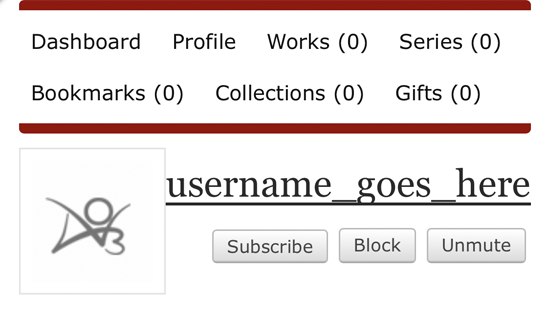
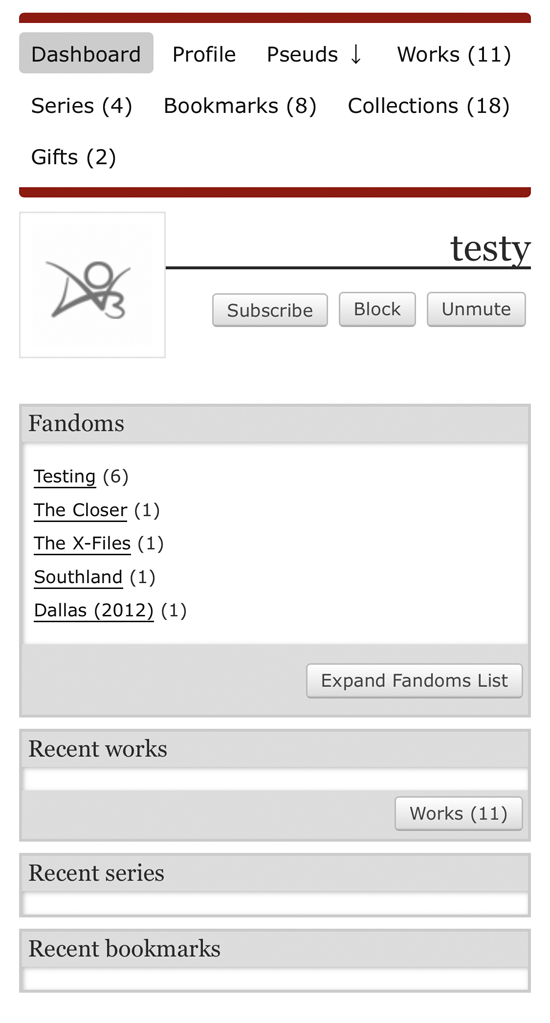
The dashboard of a user you have muted will show no content under the Recent works, Recent series, and Recent bookmarks headings.

How do I mute users?

A "Mute" button will be added to user and pseud dashboards as well as user profiles. It will turn into an "Unmute" button when activated, so you can easily reverse your choice.

The Mute button will join the Subscribe and Block buttons underneath the username on a dashboard page.

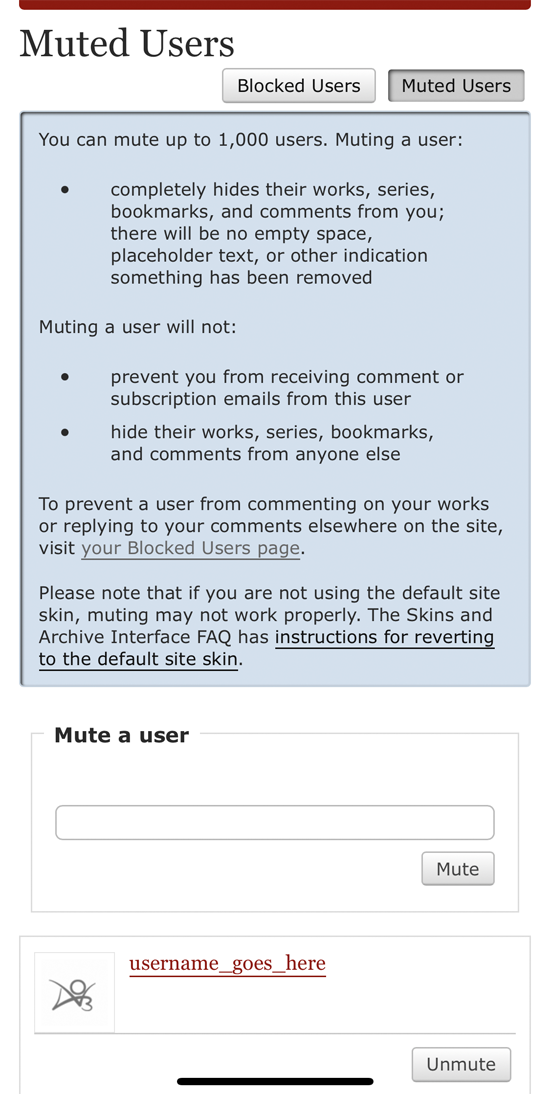
We're also providing an interface to manage your muted users. It allows you to add new users to your list, and unmute users. A muted user will remain muted even if they change their name.

The Muted Users page describes what muting does and allows you to mute additional users via a small form. It also lists users you have muted and provides an option to unmute them.

From this page, you can also easily access your list of blocked users, to manage those separately.

Other options

In addition to our blocking and muting features, there are a variety of existing ways to control your Archive experience, including built-in preferences and third-party tools. You can also use a site skin to mute specific works, bookmarks, or series.

Comment

Post Header

We're pleased to announce that, in the coming days, we'll be rolling out the first part of our blocking and muting features: the ability to block specific logged-in users from commenting on your works and replying to your comments.

Blocking and Muting: A Refresher

We'll be implementing two sets of features to help users curate their own experiences and add a layer of protection against harassment, without making it harder for people to create and interact with content on the Archive:

  • Blocking, which will prevent certain users from interacting with you.
  • Muting, which will exclude content by certain users from your personal Archive experience.

Because applying these concepts to all of the Archive's numerous and often interconnected features at once would be a massive undertaking, we're taking a gradual approach that will allow you to block and mute users in some areas while we continue to work on others.

Blocking Part 1: Comments

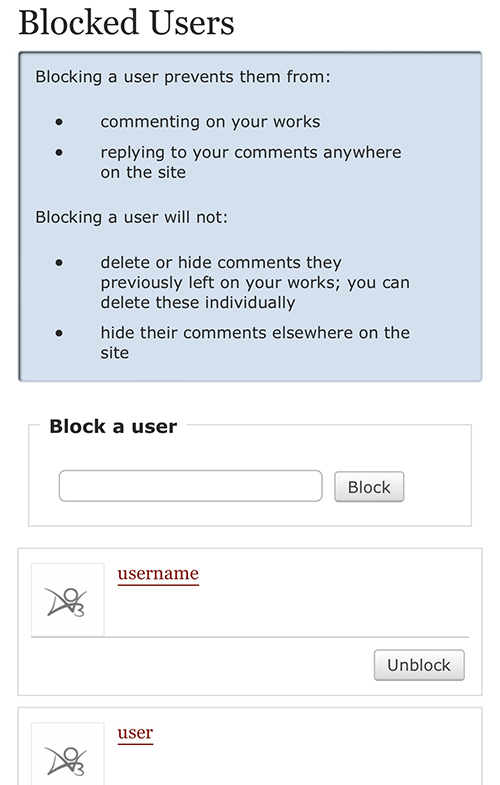
The Blocked Users page describes what blocking does and allows you to block additional users via a small form. It also lists users you have blocked and provides an option to unblock them.

With this first release, we're focusing on blocking comments from logged-in users. When you block a user, they will no longer be able to comment on your works or reply to comments you've left on news posts or other creators' works. They will also be unable to edit existing comments or replies they've left you.

The block will persist even if the blocked user changes their name.

You can block a user by pressing the "Block" button on their profile, dashboard, or comments. Users you've previously blocked can be unblocked from these locations as well.

You can also block a user by entering their name on the new Blocked Users page, accessible by following the "Blocked Users" link on your preferences page.

The Blocked Users page lists all of the users you've blocked. Other users will not be able to see who you've blocked -- the only people with access to your list of blocked users will be you and site admins with certain access levels.

If you suspect someone you've blocked is still commenting on your works or replying to your comments elsewhere on the Archive, contact the Policy & Abuse team.

Please note that if you block a user with whom you've co-created works, your blocked co-creator will still be able to comment on works you've co-created. However, they will not be able to reply directly to your comments on those works.

Muting: An Update

We're working on a similar interface for muting logged-in users, but in the meantime, you can mute users, works, series, or external works by creating a site skin and using the following CSS:

  • .user-000 { display: none !important; } to hide all of a user's works, series, and bookmarks from work and bookmark listings and search results, as well as any logged-in comments the user has left on works or news posts. Replace 000 with the ID of the user whose works you want to hide. A user's ID is a series of numbers that can be found on the user's profile in the "My user ID is" section. A user's ID does not change if the user changes their name.
  • .work-000 { display: none !important; } to hide a specific work from work and bookmark listings and search results. Replace 000 with the ID of the work you want to hide. The work ID is a series of numbers that can be found in the work URL. The ID comes immediately after /works/, e.g. /works/000/chapters/123.
  • .series-000 { display: none !important; } to hide a specific series from bookmark listings and search results, as well as users' series pages. Replace 000 with the ID of the series you want to hide. The series ID is a series of numbers that can be found in the series URL. The ID comes immediately after /series/, e.g. /series/000.
  • .external-work-000 { display: none !important; } to hide a specific external work from bookmark listings and search results. Replace 000 with the ID of the external work you want to hide. (Note that there may be multiple copies of a given external work, each with a different ID.) The external work ID is a series of numbers that can be found in the external work URL. The ID comes immediately after /external_work/, e.g. /external_work/000.

To hide multiple items, you can separate the selectors with a comma: .work-000, .work-149319, .user-000000 { display: none !important; }

Other Options

In addition to the upcoming blocking and muting features, there are a variety of existing ways to control your Archive experience.

Our Unofficial Browser Tools FAQ lists some third-party scripts that let you filter out unwanted content, and here are some built-in options for managing various features:

We're always working on more options like this, so be sure to check back regularly -- we announce most major changes here at AO3 News shortly before they're released. You can also follow @AO3_Status on Twitter or ao3org on Tumblr to stay up to date.

Update 20:59 UTC 10 June 2022: These changes have now been deployed.

Comment

Post Header

In the next few days, we'll be rolling out a new preference to give users more control over who can give them gift works. This change is an important step in our ongoing work to give users more options to control their experience on the Archive and limit unwanted interactions.

The preference will be called "Allow others to give me gift works outside gift exchanges and prompt memes."

When this preference is enabled, any AO3 user will be able to give you a work. That's the current behavior on the Archive, and it will be the default behavior for all existing users.

When the preference is disabled, the only users who will be able to give you works are users who have either been assigned to create a fanwork for you in a gift exchange or claimed one of your non-anonymous prompts in a prompt meme. In other words, if you absolutely do not want to receive gifts from anyone, you can disable this preference and avoid signing up for challenges.

The preference will be disabled by default for accounts created after the roll out. (We'd usually disable any new preferences by default, but allowing gifts is necessary to avoid interfering with ongoing challenges.)

If a user has the preference disabled and you attempt to give them an unrequested gift, you will receive an error message telling you the user does not allow gifts.

The preference only applies to new gifts, so you will still be able to edit any existing gifts without removing the recipient.

Your Gifts page will remain accessible regardless of whether you've enabled or disabled the preference. You will still be able to refuse existing or new gifts.

Wait, what?

  • If you're an existing AO3 user, nothing will change unless you update your preferences.
  • If you never want to receive gift works, you can uncheck "Allow others to give me gift works outside gift exchanges and prompt memes" on your preferences page and avoid signing up for any challenges.

We'll update this post to let you know when the changes have been deployed.

Update 10:10 UTC 6 February 2022: These changes have now been deployed.

Comment

Post Header

In the coming days, we'll be rolling out a code change that limits the total number of fandom, character, relationship, and additional tags that can be added to a work. This limit of 75 tags will apply to both new and existing works, but no tags will be automatically removed from existing works.

Why place a limit on tags?

Having a limit on tags will:

  • help keep work blurbs to a reasonable length, improving the experience of navigating work listings, and
  • encourage creators to tag for the most important elements of their works, improving the quality of search results.

Why 75 tags?

We looked at all the works on the Archive and determined that:

  • the average number of tags per work is 17,
  • the most common number of tags per work is 11, and
  • less than 0.5% of works have more than 75 tags.

A limit of 75 total fandom, character, relationship, and additional tags per work will provide the vast majority of creators with enough space to describe the content of their works while also keeping work blurbs to a manageable size.

Why don't ratings, categories, and warnings count toward the limit?

Ratings, categories, and warnings already have limits of their own. A work can only have one rating, and the number of categories and warnings a work can have is limited by the number of options provided on the posting form.

What should I do if I notice someone's work has more than 75 total fandom, character, relationship, and additional tags?

Nothing! Works that exceed the tag limit do not violate the Terms of Service and should not be reported to the Policy & Abuse team or the Support team.

What happens to previously posted works with more than 75 total fandom, character, relationship, and additional tags?

Nothing! The work will keep all of its tags.

However, if the work creator wants to edit the work or add a chapter, they will have to remove some of their fandom, character, relationship, and/or additional tags before they can save their changes. (An error message will tell the creator exactly how many tags must be removed.)

Comment

Post Header

In our next release, we'll be rolling out two changes to comments on the Archive. The first change will provide both work creators and site admins with the ability to freeze comment threads. The second change will provide site admins options to restrict comments on news posts, much like creators can restrict comments on their works.

Comment freezing

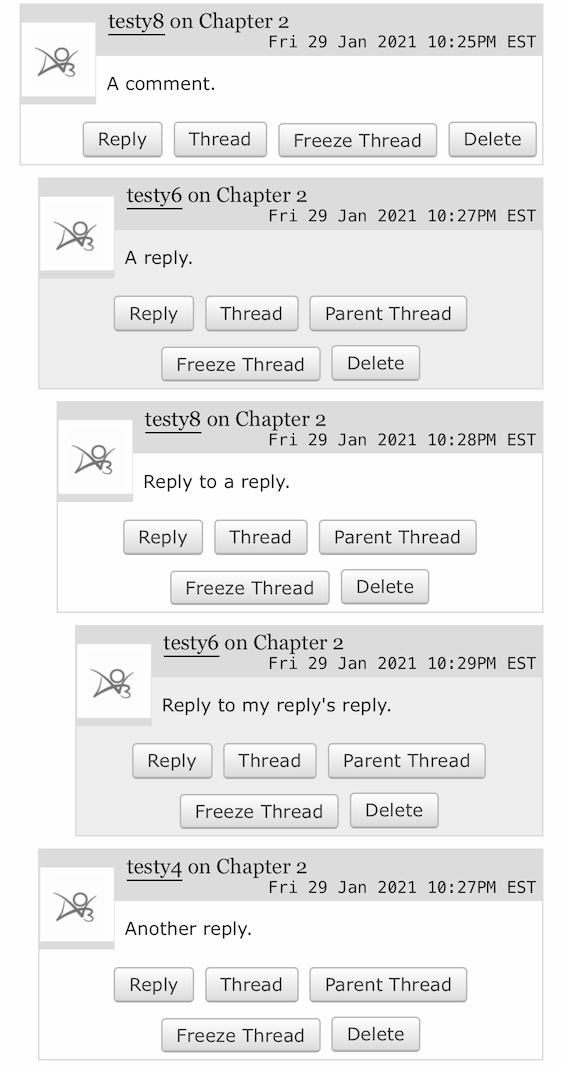
Creators will soon be able to freeze comment threads on their works using the "Freeze Thread" button. Freezing a thread prevents new replies from being added to a comment or to any of its replies. It also prevents comments in the thread from being edited.

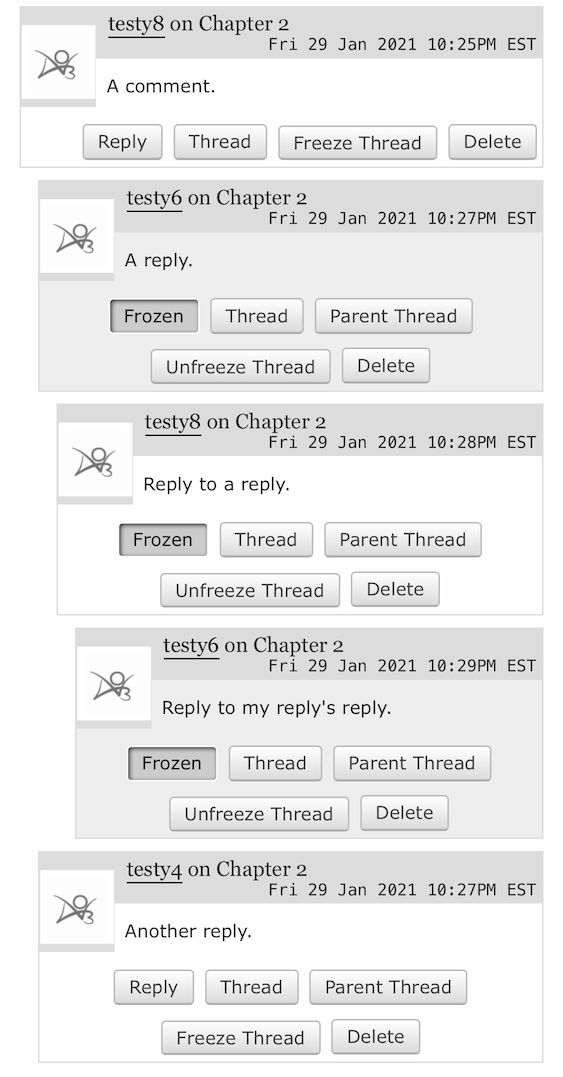
A comment with replies. Each comment has a Freeze Thread button.

Frozen comments will have a "Frozen" indicator and the "Reply" button will be hidden. An "Unfreeze Thread" option will allow creators to re-enable replies.

A comment with replies. The first reply and its replies are frozen and have a Frozen indicator, which looks like a pressed button. They also have Unfreeze Thread buttons.

Although "Freeze Thread" initially prevents replies to all comments in a thread, creators can use "Unfreeze Thread" to selectively re-enable replies for some comments in a thread.

Site admins will also be able to freeze comments on news posts, and the Policy & Abuse team will be able to freeze comments anywhere on the site.

News post comment settings

In August, we gave creators more control over who can comment on their works, enabling them to choose between allowing comments from anyone, restricting comments to registered users, or turning comments off completely.

Site admins will soon have the same options when creating and editing news posts. This will allow our teams to turn off comments on outdated news posts and prevent newer ones from being overwhelmed by spam (e.g. advertisements or, more commonly, short series of random letters left by bots).

If comments on a news post are turned off, or if you're logged out and comments are restricted to registered users, the comment form will be replaced with a message indicating which setting is in use.

If you can't comment on a news post, you are always welcome to contact Support with any feedback.

We hope both of these changes will help the users and volunteers who read, write, and receive comments on the Archive!

Edit, February 12, 21:20 UTC: Comments on this post had to be disabled due to off-topic discussions, trolling, and harassment.

Comment

Post Header

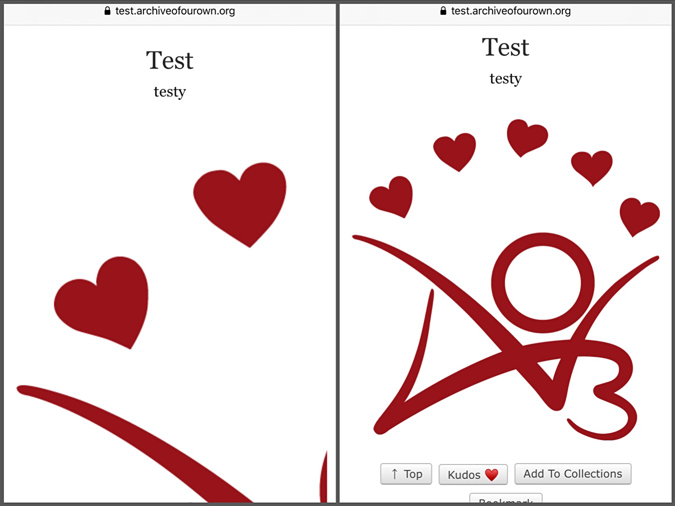
In the next few days, we'll be making a small change to the way images are displayed in fanworks. To make the Archive friendlier for smaller screens, we're updating the default display of images to ensure they won't be any wider than the full width of your screen.

Before and after: A work with the AO3 logo partially cut off on the right side, and with image resized so the full image fits on screen.

This change will apply to both new and existing works, and it's being done using CSS. That means it only affects how the image is displayed on the Archive -- the image files themselves are not being modified.

If you're an artist and you'd like to make it easier for others to view your art in a larger size, we recommend providing a link to the full size image. Our FAQ describes how to make a link with HTML, or you can use the link button on our rich text editor.

Art lovers who'd like to view an image at full size, your browser can probably help! The directions will vary depending on your device and browser, but generally, you can right-click (or your device's equivalent) on an image to open a menu, which should have an option for opening the image in another tab or copying the image's web address, which you can then visit. For more detailed instructions, we recommend going to your favorite search engine and searching for "open image in another window" and the name and version of your browser, operating system, or device.

Comment

Post Header

In the next few days, we will be adding a new option that allows work creators to turn off comments. The option will be available on the forms for posting or editing individual works as well as the form for updating multiple works at once, and we've done some minor rearranging of the forms to accommodate the new option.

What turning off comments does

Turning off comments will replace the comment form at the end of your work with a notice that says, "Sorry, this work doesn't allow comments."

If your work already has comments, all existing comments will remain accessible to you and anyone who can access your work. You will still be able to delete any unwanted comments or mark guest comments as spam.

Users who have left logged-in comments on your work will also still be able to delete their comments.

How to turn off comments on individual works

In the "Privacy" section of the posting and editing forms for individual works, you will find a set of options called "Who can comment on this work." It will have three options:

  • Registered users and guests can comment
  • Only registered users can comment (this is equivalent to the old "Disable anonymous commenting" option)
  • No one can comment

By default, it is set to "Registered users and guests can comment." To prevent anyone from commenting on your work, choose "No one can comment" and save your changes.

How to turn off comments on multiple works

If you'd like to change the comment settings for more than one work at a time, you can use the Edit Multiple Works page. (Please refer to "How do I edit multiple works at the same time?" for information on accessing this page and selecting works to edit.)

Once you've chosen the works you want to edit, locate the "Settings" section of the form. There will a set of options called "Who can comment on these works," and it will have four choices:

  • Keep current comment settings
  • Registered users and guests can comment
  • Only registered users can comment (this is equivalent to the old "Disable anonymous comments" option)
  • No one can comment

By default, it is set to "Keep current comment settings." To prevent anyone from commenting on the works you are editing, choose "No one can comment" and save your changes.

Other options for controlling comments on your works

Please check out our Comments and Kudos FAQ for more information on controlling comments on your works, including:

Update 15 August 06:22 UTC: These changes are now live!

Comment

Post Header

Published:
Mon, 20 Apr 2020 00:12:14 +0000
Translations:
Tags:

Several weeks ago, we took emergency measures to help the Archive handle an influx of traffic. These measures successfully reduced our database load, but left us unable to add any hits from logged out users to works' hit counts. We'll be able to resume counting these hits in the next few days, although there will be some changes to hit count behavior -- and one frequently requested feature we've been able to add thanks to these changes.

How hit counts will work going forward

Previously, a work's hit count only increased if:

  • you were not logged in as one of the work's creators, and
  • you visited a single-chapter work, a multi-chapter work in entire work mode, or the first chapter of a multi-chapter work in chapter-by-chapter mode, and
  • your IP address did not match that of the visitor right before you.

This meant hits weren't counted if you followed a direct link to a later chapter, e.g. from a subscription email, or if you were a work's sole dedicated follower who returned to it day after day.

The revised code will increase the work's hit count if:

  • you are not logged in as one of the work's creators, and
  • you visit a single-chapter work, a multi-chapter work in entire work mode, or any chapter of a multi-chapter work in chapter-by-chapter mode, and
  • your IP address has not visited the work in the last 24 hours.

This means a work's hit count will still only increase by one regardless of whether you visit one chapter or fifty, but it will no longer matter if you start on the first chapter or the tenth, or if someone else accessed the work between your daily visits.

As always, hit counts are updated approximately every half an hour to avoid placing unnecessary strain on our servers, although caching means it may take an hour for the new total to appear for logged out users.

Privacy

We don't want to hold on to your data any longer than absolutely necessary, so IP addresses used to calculate hits will be removed from our system within 48 hours of being collected.

However, the new code is JavaScript based, so you can disable JavaScript in your browser settings or by using a browser extension if you have any privacy concerns. (As always, our Privacy Policy has more information on what data we collect and how we use it.)

Hit count preferences

The preferences allowing logged in users to control the display of hit counts have been buggy or non-functional for years now, and the problem has only gotten worse as we've increased the amount of caching we do.

Therefore, we'll be removing the following preferences when the new hit count code is deployed:

  • Don't show me any hit counts
  • Don't show me hits on my works
  • Don't show other people hits on my works

If you'd prefer to avoid seeing hit counts after these preferences are removed, you can hide them with a site skin.

If you're not already using a site skin:

  1. Log in.
  2. Go to the Public Site Skins page.
  3. Choose "Create Site Skin" to go to the Create Site Skin page.
  4. Fill in the "Title" field with a unique title, e.g. "[Your username's] skin for hiding hits."
  5. In the large "CSS" field, enter the following: .stats .hits, .statistics .hits { display: none; }
  6. Press "Submit" to save your skin.
  7. Press "Use" to apply the skin.

If you're already using a public site skin like Reversi:

  1. Follow steps 1-5 from the instructions above.
  2. Press the "Advanced" section's "Show ↓" button to reveal more options.
  3. Press "Add parent skin" to add two new fields to the form, directly over the button. One field will be filled in with the number "1" and the other field will be blank.
  4. In the blank field, enter the name of the public site skin you are currently using. The autocomplete will help you find it.
  5. Press "Submit" to save your skin.
  6. Press "Use" to apply the skin.

If you're using a site skin that isn't public, you can try adding the code from these instructions directly to the skin, but it may need some adjustments depending on the other styles in your skin.

Latest chapter links

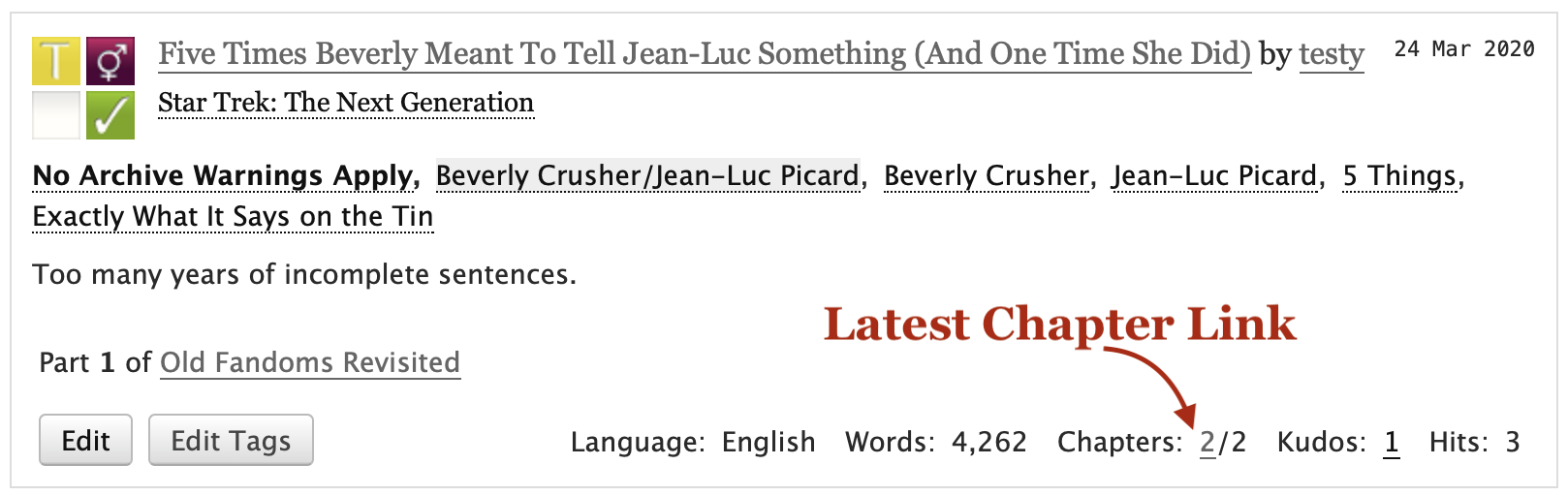
Now that going directly to any chapter of a work will increase its hit count, we've updated work blurbs to include a link that will take you from any work listing directly to the work's most recently posted chapter.

A work blurb showing the first 2 in Chapters: 2/2 is now the latest chapter link.

On multi-chapter works, the first number in the "Chapters" information at the bottom of the blurb will now be a link to that chapter, making it that much easier to get to the latest installment of your favorite work in progress.

We expect to roll out these changes in the next few days, once we've completed testing and coordinated our volunteers' schedules. We'll give a heads up on the @AO3_Status Twitter account shortly before we begin and add an update to this post once the changes are live.

Updated 08:30 UTC April 22: The changes in this post have now been deployed.

Comment

Post Header

The Archive has seen a marked uptick in traffic during March, with weekly page views increasing from 262 million to 298 million in just two weeks. We expect this trend to continue, and in order to keep the site running, we need to take emergency measures. The quickest, most helpful change we can make is caching the works we serve to logged out users. Unfortunately, this means that starting immediately, logged out users may experience a delay in work updates, and hits from logged out users will no longer be included in works' hit counts.

Why is this happening?

The increased traffic is putting a strain on our database servers, which receive dozens of requests every time someone loads a work. (We plan to order new hardware to help with this strain, but first we need to finish some ongoing server maintenance and determine which hardware to order. Delivery and installation of servers ordinarily takes a few months, and there may be unexpected delays due to the pandemic.)

Serving cached copies of works to logged out users will drastically reduce the number of database requests we make. Caching means we don't have to ask the database for the latest information every time someone visits a certain page in a given period of time. Instead, one of our front end servers gives everyone the exact same copy of that page. After about an hour, that copy is updated.

What changes will I notice?

Starting immediately, you may notice the following changes:

  1. When a new chapter is posted, logged out users will only be able to access it by direct link until the cache updates, which will happen about once every 60 minutes. Other changes to the work (e.g., edits made by the creator or new comments or kudos that have been left) may also not be visible to logged out users until the cache is updated.
  2. Because work pages need to be identical for all logged out users, we've had to stop automatically filling in guests' names and emails on the comment form. (You can request an invitation and create an account if you'd like the form to remember you!)
  3. Logged out users will see the adult content warning on every work rated either Mature, Explicit, or Not Rated. This is temporary and will be fixed as soon as possible.
  4. New hits from logged out users will not be added to works' hit counts. (Existing hits will not be lost.) The code that increases hit counts lives on our application servers, so it will not run when the front end servers hand out cached copies of works.

(This section was updated at 00:25 UTC April 1.)

Will hit counts be fixed?

We are exploring options that will allow us to resume counting hits from logged out users, but it may take some time to find and implement a viable long term solution. We'll work as quickly as we can, but we ask for your patience -- our volunteers may need to prioritize additional performance improvements or their own wellbeing in these stressful times.

We will keep you updated on any significant progress or setbacks here on AO3 News and on our @AO3_Status Twitter feed.

Updated 11:00 UTC April 24: We have deployed new code that allowed us to resume counting hits from logged out users, along with some general changes to how hits are being measured.

Comment

Post Header

We're making a few behind-the-scenes changes to kudos to make sure the Archive can continue to handle the tremendous number of them (659 million and counting!) that users and guests have left over the years. Kudos will continue to work the same, but there will be a new check in the database to make extra certain duplicate kudos can't be left. This will result in a one-time drop in kudos on works that already have duplicates.

Previously, we relied on the kudos code to make sure a single user or guest could only leave kudos on a given work one time. This worked just fine in most cases, but sometimes a slow connection or quick double press of the kudos button could lead to multiple kudos being recorded.

We'll be adding a constraint at the database level that should prevent this from happening. However, this change will also make any existing duplicates invalid and remove them from the database. This means that if you have received multiple kudos from the same user or guest on one of your works, your kudos total will go down when we deploy this change. For example, if your work has three kudos from the same user, the total number of kudos on the work will drop by two.

We plan to make our changes on Monday, March 16, and we expect some brief downtime at the end. We can't predict for certain what time it will be, but we will do our best to give a heads up on the @AO3_Status Twitter before it happens.

Comment

Post Header

Did you know you can post and browse works in over 70 languages on the Archive? In fact, AO3 is home to roughly 400,000 fanworks in languages other than English, with more posted every day! To help everyone find works in their preferred language, we've made some small changes to posting and searching.

Previously, the "Choose a language" field on the posting form was set to English by default, which made it easy to accidentally post a non-English work with the language set to English.

To fix this, we've updated the "Choose a language" field so English is no longer the default. Instead, everyone will need to select the correct language when posting a new work. If you forget, don't worry -- we've also added a friendly error message to remind you.

We've also made it a little easier to search or filter for works based on language! While we provide a "Language" field on our various search and filter forms, sometimes it's not enough -- for example, if you want works in either Spanish or Italian.

A search like that used to require knowing some numerical codes unique to the Archive. Now you can use these standard language codes with the search operators described in our cheatsheet. For example, to find works tagged with "Friendship" in either Italian or Spanish, you would enter language_id: es OR language_id: it in the "Search within results" field on the work listing for the "Friendship" tag. (The old numerical codes will continue to work, so there's no need to update bookmarks or links.)

We hope these changes will make the Archive a bit better for everyone, regardless of which languages you use for creating and consuming fanworks. And as always, if you notice a work with the wrong language, you can contact our Policy & Abuse team and they will help correct any mislabeled works.

Comment

Post Header

Published:
Thu, 07 Nov 2019 08:36:14 +0000
Tags:

We're excited to announce we've recently added support for the <audio> and <video> HTML elements! With this change, you'll be able to use these tags to embed your self-hosted audio or video fanworks on AO3.

Unlike the Flash-based audio player we already offer, these new elements will work in all modern browsers, and they will continue to work even after Adobe ends support for Flash in 2020. (While we have no plans to remove Dewplayer at this time, we strongly recommend updating to the <audio> tag.)

Basics

There's still a lot of design, policy, and coding work to do before we can host audio and video files, so for now you'll need to upload your files to your own web space. Once you've done that, you can embed the file in your work with a small bit of HTML:

  • <audio src="AUDIO URL"></audio>
  • <video src="VIDEO URL"></video>

That's all it takes! Exactly how the resulting media player looks depends on the browser being used to access the work. We do, however, make sure that playback controls are available and adjust the width of videos using CSS to ensure big videos will fit on everyone's screens. We also make sure autoplay can't be enabled, and we add the preload attribute to gently suggest browsers save bandwidth by not loading the full file until you press play.

Complex examples

If you'd like to do something more complex, we support that as well. For example, you can include a poster for your video using the poster attribute (poster doesn't work for audio, but you can still include an image above your audio player):

<video src="VIDEO URL" poster="IMAGE URL"></video>

Because some older browsers don't support these elements, you can also include fallback text on either element to provide a download link:

  
<audio src="AUDIO URL">
  <p>Your browser doesn't support streaming with the HTML5 audio tag, but you can still <a href="URL">download this podfic</a>.</p>
</audio>

Because different browsers support different file formats, you might want to use the <source> element to include multiple formats.

  
<video>
  <source src="WEBM VIDEO URL" type="video/webm">
  <source src="MP4 VIDEO URL" type="video/mp4">
</video>

If you'd like to include captions or subtitles to improve the accessibility of your media file, you can do that with the <track> element:

  
<video>
  <source src="VIDEO URL" type="video/mp4">
  <track src="SPANISH SUBTITLE URL" kind="subtitles" srclang="es" label="Spanish" default>
  <track src="ENGLISH SUBTITLE URL" kind="subtitles" srclang="en" label="English">
</video>

List of allowed tags and attributes

Here is a full list of the tags we've added support for and which attributes you can use on them.

<video> element

  • class attribute
  • dir attribute
  • height attribute
  • loop attribute
  • muted attribute
  • poster attribute
  • src attribute
  • title attribute
  • width attribute

<audio> element

  • class attribute
  • dir attribute
  • loop attribute
  • muted attribute
  • src attribute
  • title attribute

<track> element

  • default attribute
  • kind attribute
  • label attribute
  • src attribute
  • srclang attribute

<source> element

  • src attribute
  • type attribute

You can get more information on using these elements and their attributes in these articles from MDN:

Edit November 8 at 07:53 UTC: If your audio or video file isn't loading on the Archive, you probably need to enable Cross-Origin Resource Sharing (CORS) on your website. Your web host's documentation or support department should be able to help.

Comment

Post Header

To cut down on abuse, we have just rolled out some changes to co-creating works, chapters, and series on the Archive. Until now, it was possible for any user to list you as a co-creator without your approval. We've added creator invitations to ensure you won't be listed as a co-creator until you accept the invitation. Additionally, we've added a preference that requires you to opt in before other users can invite you to become a co-creator.

Nothing will change about existing co-created items: all creators will still be able to edit the work, chapter, or series even if they do not enable the preference. Before you can be invited as a new co-creator, however, you will need to enable the "Allow others to invite me to be a co-creator" option on your Preferences page. (Where can I find my Preferences?)

Turning the preference off will not remove you from any co-created items, nor will it prevent any of the item's existing co-creators from making changes. You can turn the preference on and off as many times as you like. Turning the preference off will not delete any co-creator invitations -- you'll still be able to find them by following the "Creator Invitations" link on your Dashboard when you turn the preference back on.

If you need to add a co-creator who does not have the preference enabled and who you are unable to contact, you can use the Notes field to provide proper credit.

We're sorry we weren't able to announce this change ahead of time like we usually do, but adding co-creators who did not wish to be associated with a work was becoming an increasingly common abuse and spam tactic, and we didn't want to cause a spike in these incidents by publicizing it before this fix was live. We hope the changes provide relief for users who have been targeted and help everyone feel more in control of their experience on the Archive.

Comment

Post Header

Published:
Sat, 09 Feb 2019 22:01:58 +0000
Tags:

Soon we'll be replacing our current method for generating work downloads with the Calibre command line interface. Our current patchwork system of third-party tools and custom code comes with a number of bugs and limitations, and moving to a well-maintained and documented application like Calibre will enable us to better maintain and even enhance the download feature going forward.

Because this is an entirely new system, there will be some differences between old and new files. We've provided an overview of these changes and some previews below, but we're still testing these changes, so there may be some minor differences between the previews and the final versions. Additionally, exactly how a file looks and behaves may vary depending on your device, software version, and settings.

HTML & PDF

HTML files serve as the basis for all of our download files, so it was necessary to make a few tweaks to help Calibre create tables of contents for other download types. Most of these tweaks are invisible, but we did make one visible change: the work title is now included at the top of the file, above the URL. Aside from these minor changes, HTML downloads will remain the same.

Because generating PDF downloads with Calibre would require us to install additional software on our servers, we will continue to use wkhtmltopdf to create PDFs, although we have upgraded it to a newer version. Like HTML downloads, PDFs will now include the title at the top of the first page but otherwise remain the same.

EPUB & MOBI

The biggest changes will be to MOBI and EPUB files, which are currently very different from each other due to limitations that existed when our system was created nearly ten years ago. The new code will give these files a more consistent look and feel and allow readers to take advantage of some features ebook readers provide.

EPUB

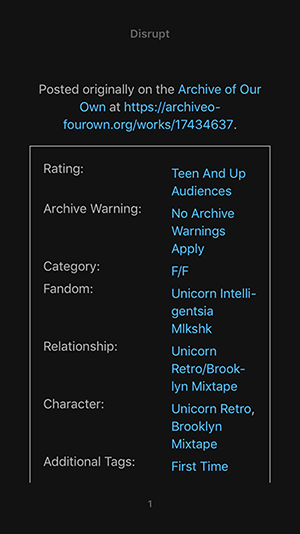
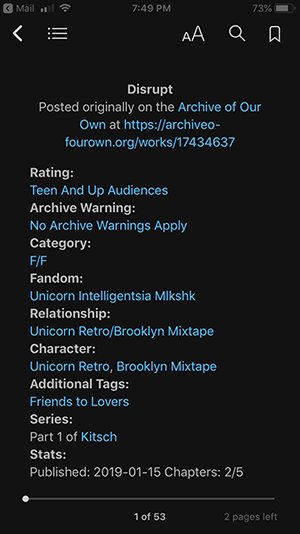
A current EPUB open in the iPhone Books app. The work meta is displayed in two columns inside a box. A new EPUB open in the iPhone Books app. The work meta is displayed as a bold heading, e.g. Rating, above the relevant tags.

The new EPUB files will do away with the two-column display of work meta (i.e. tags and statistics), which doesn't work well for small screens, lots of tags, or large font sizes.

This update will also fix the bug where EPUB files were missing chapter endnotes.

You can download an example of the new EPUB files to preview on your device.

MOBI

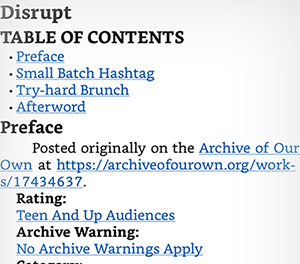
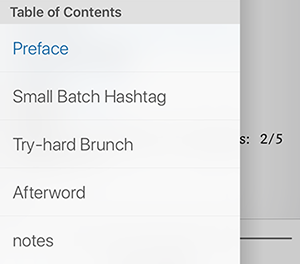
First page of a current MOBI file on the iPhone Kindle app, cropped to show the table of contents links provided at the top. A new MOBI file on the iPhone Kindle app, cropped to show the file's table of contents in the app menu.

Our current system provides a list of links on the first page as a makeshift table of contents, but Calibre will create files designed to work with your device or app's built-in table of contents function. (As you navigate with the shiny new table of contents, you may also notice each chapter begins on a fresh page.)

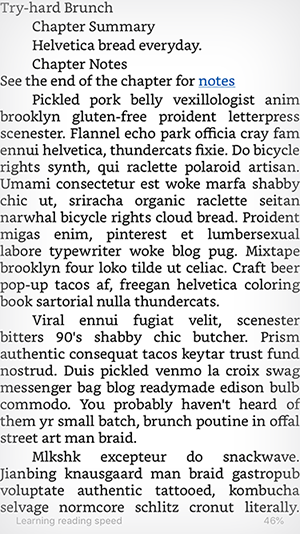
The text of a chapter in a current MOBI file on the iPhone Kindle app. The text of a chapter in a new MOBI file on the iPhone Kindle app.

Calibre will also add margins to prevent the text from running against the edge of the page. Additionally, we've switched from using indented book-style paragraphs to using vertical margins to create blank lines between paragraphs, bringing MOBI files in line with how text is formatted on the site and in other download files.

This update also brings a major improvement for internationalization: MOBI files of works written in non-Latin alphabets will no longer be automatically transliterated! Please note, however, that MOBI offers only limited support of right-to-left languages like Hebrew and Arabic, so Kindle users will need to use AZW3 to read works in those languages.

You can download an example of the new MOBI files to preview on your device.

AZW3

We'll also be adding a new download format: AZW3, which was created by Amazon for use with Kindle devices and apps. It's a newer format than MOBI, and it will allow us to offer Kindle users downloads of works in right-to-left languages, but it will otherwise look the same.

AZW3 downloads will be available on all works, but if you rely on Send to Kindle to transfer files to your device, you'll need to stick with a different format: Amazon doesn't allow you to send this file type. However, you can still transfer AZW3 files to your Kindle by downloading them to your computer and connecting your device.

If you're using the Kindle app on an Android device, you can move AZW3 files you've downloaded to your SD card's Kindle folder in order to access them. Unfortunately, there doesn't appear to be a workaround for the iOS Kindle app, so iPhone and iPad users will need to use another download format or a different, non-Kindle app.

Deploy date

While this upgrade won't immediately resolve all of the existing issues with downloads, it's an important part of the process, and it will ultimately make the Archive more secure and more maintainable. (After the deploy, our release notes will have more detail on specific bugs this change has fixed.)

We're still in the testing stages, but we plan to deploy these changes sometime after February 11. When the time comes, we'll announce it on our @AO3_Status Twitter account.

No downtime is expected, but if you have a work already loaded in your browser at the time of the update, you'll need to refresh the page to download it.

Comment

Post Header

🎁

Thanks to a long-planned database upgrade, the AO3 now lets you use all the latest emoji, as well as extended character sets for several languages (such as some of the rarer characters used for Chinese and Japanese) in your works, comments, or profile. 🎉🍾🎈🎊🎇. In fact, all text fields now support the UTF8MB4 character set, except for a few we've limited to Latin characters and some punctuation marks, like pseuds or collection names.

🔧

UTF8MB4 encoding only became available a few years after the Archive's inception, so we already had a pretty sizeable database using the older encoding when the upgrade became inevitable. After our recent server work, which included an upgrade to MySQL 5.7, people trying to post a work or comment with an unsupported character (e.g. one of the newer emoji) would be served an unhelpfully blank error page, exacerbating the problem.

However, migrating our entire 617GB database would have been a massive undertaking, likely necessitating several days of downtime. Fortunately, we were able to come up with a game plan that allowed us to keep downtime to a minimum by making changes to a new, empty copy of a database table while the "old" table with all the data was still in use. Once the new table was ready, we copied the data over and put the new table to use, then moved on to the next table.

😱

Thanks to the diligent efforts of our volunteer sysadmin james_, we completed the work in a little over a week and with no data lost. However, we ran into an unexpected problem with one of the constraints we put on our database to prevent the creation of multiple tags with identical names.

Due to a change in the way data is compared, some characters such as ss and ß are now treated as identical. That means that when we copied a tag like "Weiss Kreuz" to the new system, and then a few seconds later tried to copy "Weiß Kreuz," the second tag would be considered a duplicate and get quietly dropped. This made works originally posted to the dropped tag hard to find for a few days, since the tag didn't appear on the work anymore.

Once we discovered the issue and tracked down the cause, we were able to use a database backup to reconstruct the changes we'd made up to the point of the final swap, so we could compare the two tables and restore the lost tags.

👍

Together with our tag wranglers, we have put all the affected tags back into the system, so they will now appear on their works again. We are sorry if your works or bookmarks were affected by this issue!

Even though our upgrade is now complete and our database allows all of these new characters, keep in mind that some devices and browsers, as well as apps and e-readers relying on the MOBI format, might not display them properly. However, we hope you'll enjoy all your new emoji options and leave some extra-colorful love for creators in your comments! ❤🧡💛💚💙💜

Comment


Navigation